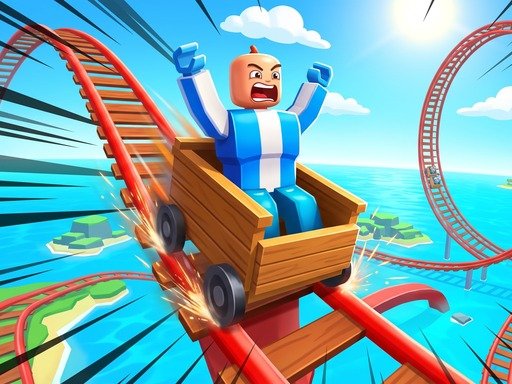
Obby Cart Rush puts you in a wooden minecart on rails and sends it down roller-coaster-style tracks across five themed worlds — Mountain, House, Forest, City, and Zoo. The core loop is simple: hold to accelerate, and let go or brake before the speed-warning signs so you don’t fly off the track through a loop or a steep drop. Reaching the flag at the end of a track earns you a medal, with faster, cleaner runs pushing you from Bronze up to Silver and Gold. Because each world uses a fixed track layout, memorising exactly when to brake matters as much as reflexes, which gives the later worlds real replay value if you’re chasing a better medal.
How to play Obby Cart Rush
1. Start the level and hold the accelerate control to speed your cart along the track.
2. Watch for speed-warning signs and let go or brake just before them.
3. Hold on through loops and drops once you've slowed to a safe speed.
4. Reach the flag at the end of the track to finish the run.
5. Aim for a faster clean time to move from a Bronze medal up to Silver or Gold.
Controls
- Desktop W or Up Arrow – Accelerate | S or Down Arrow – Brake | R – Restart. Mobile: on-screen gas and brake pedals with a joystick
Tips
- Braking too late is the most common way to lose a run — start slowing down as soon as you spot a speed sign rather than waiting until you're right on top of it. Since each of the five worlds has a fixed layout, even a rough first run is useful: note where you crashed or slowed unnecessarily, then adjust your braking points on the next attempt instead of just trying to go faster overall.
FAQ
How many worlds does Obby Cart Rush have?
Five — Mountain, House, Forest, City, and Zoo — each with its own track layout.
What do the medals in Obby Cart Rush mean?
Bronze, Silver, and Gold medals are awarded based on how quickly you complete a track, with faster runs earning higher medals.
Can I play Obby Cart Rush on my phone?
Yes, it has on-screen gas and brake pedals with a joystick for mobile, and works best in landscape orientation.
Do I need to steer the cart myself?
No — the cart follows the track automatically. Your job is to control its speed with the accelerate and brake controls.